Khoury College of Computer Sciences
CS 4550 / CS 5610 · Web Development · Fall 2026
Open-Ended Web Application
Final Project Requirements
Page Requirements
Your Web application must have at least the following six (6) distinct screens: Login/Register, Home, Profile, Search/results, Details. Below is a proposed navigation diagram
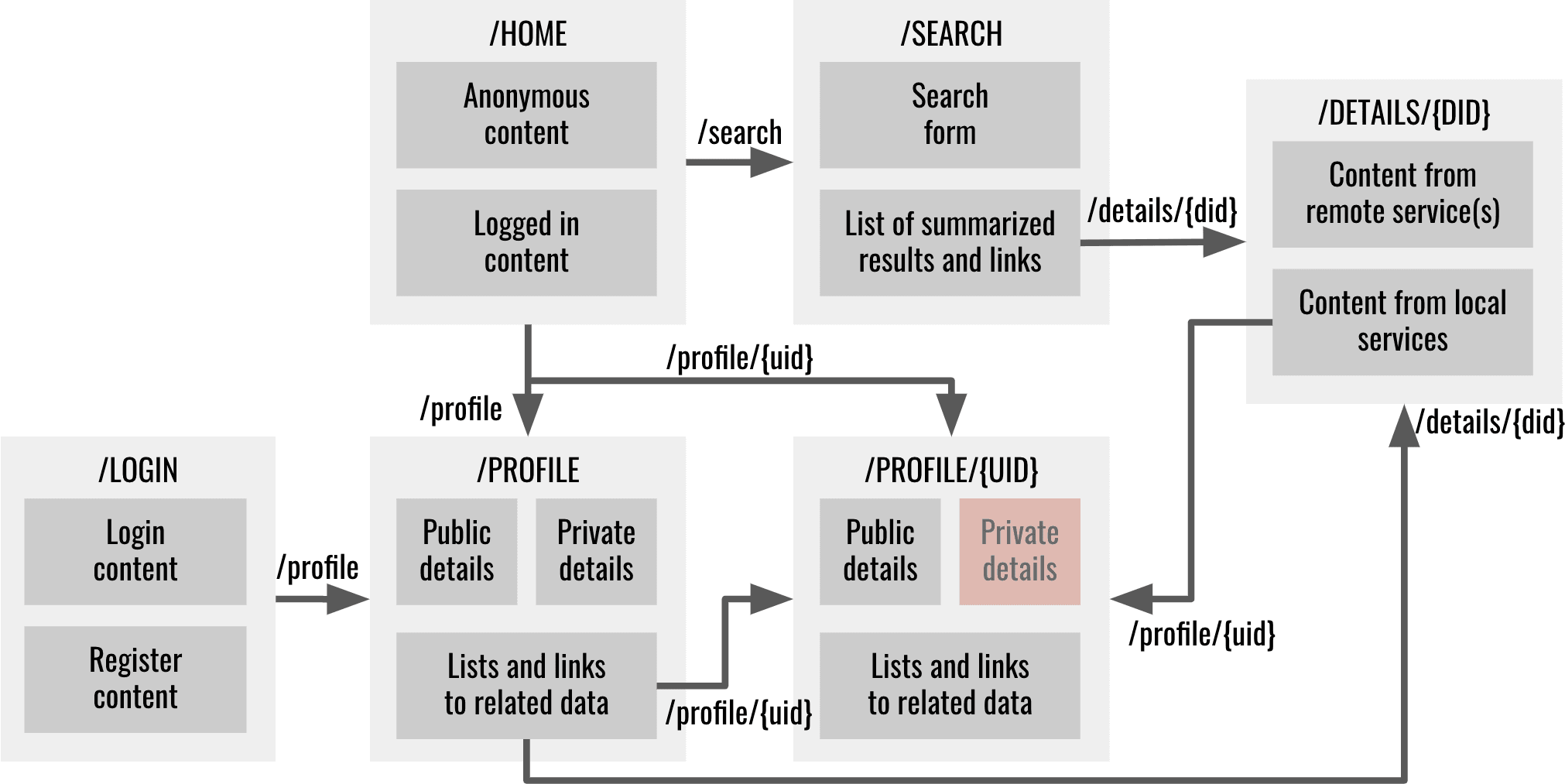
You are free to implement an alternative navigation as long as provide equivalent functionality
Home page requirements
Home - this is the landing page of your web application. It is the first page users should see when they visit your website. The home page must fulfill the following requirements.
- Must be mapped to either the root context ("/") or ("/home").
- Must be the first page when visiting the website
- Must display generic content for anonymous users. The content must be dynamic based on the latest data. For instance, you might display snippets and links to the most recent post, review, or member who recently joined
- Must display specific content for the logged in user. The content must be dynamic based on the most recent data entered by the logged in user. For instance, you might display snippets and links to the most recent post or review created by the logged in user
- Must be clear to what the Web site is about and must look polished and finished
Profile page requirements
The profile page where users can see all the information about themselves and other users. It could have several sections for personal information, other people they are following, who is following them, and links to related content associate with the user. It could hide some personal information depending on who is logged in and how a user configured their profile
- Must allow users to change their personal information. If a user is logged in then they can see their profile including sensitive information such as email and phone
- Must be accessible to other users including anonymous users
- Must hide personal/private information from others visiting the profile. If a user is visiting someone else's profile, then they can't see that other user's sensitive information
- Must be mapped to "/profile" for displaying the profile of the currently logged in user
- Must be mapped to "/profile/{profileId}" for displaying someone else's profile
- Must group similar/related data into distinguishable groups, e.g., Following, Followers, Review, Favorites, etc.
- Must display lists of snippets and links of all data related to a user. For instance, display a list of links to all the favorite movies, list of links of users they are following, etc. For instance:
- If user is following other users, then those users must be listed in the profile and a link must navigate to that other users profile
- If the user has bookmarked something, then it should be listed in the profile and a link must navigate to that something
- If the user has commented, or reviewed, or created some content, then there must be a functionality to list a summary of that content and navigate to that content
- You decide how to present, display, format the information
- The profile page may be implemented as several pages
Search/Search Results page requirements
The website should provide users the capability to search content from a remote service and display a summary of the results. Search and results can be in the same page or in separate pages. Maybe the search bar can be in the home page, and the results in a separate page. Or both in a separate search page. The results could be formatted in a list, or a grid, or a table. They can have a short description, and a thumbnail of the result. For instance, if you chose movies as your domain objects, then users must be able to search for movies. Users must be able to see a summary of the search results and navigate to a detail page that shows a detail view of the result. The search and results page must fulfill the following requirements.
- Must provide a form to search a remote API, not your own API
- Must provide a summarized list of results matching the search criteria. Results must come from the remote API, not your local database
- Must provide a link/button to navigate to the details page (see below)
- Must be mapped to /search when no search has been executed and no results exist
- Must be mapped to /search/{search criteria} or /search?criteria={search criteria} when a search has been executed and according results shown
- Can augment the results with related data in your local databases
- The search and results page can be implemented as either a single page or separate pages. In that case a separate route can be used such as /results/{search criteria} or /results?criteria={search criteria}
Details page requirements
The details page allow users to view a details view of the search result. They can see more information when they click on the search result. The details page must fulfill the following requirements.
- Must retrieve details from the remote API based on some unique identifier provided as a parameter from the search/results page
- Must display additional related data from the local database. For instance, if you are displaying the details of a movie, some other folks might have reviewed the movie. All reviews related to the movie must be shown in all or partial form
- Must provide links to related data/users. For instance, if you are displaying the details of a movie, and below you are displaying a list of reviews for that movie, provide links to the profile pages of folks who wrote the reviews for the movie
- Must be mapped to /details/{unique identifier} or /details?identifier={unique identifier} where unique identifier uniquely identies the item being displayed
Login/Register page requirements
The login and register page allow users to register with the web site and then login later on
- Must allow users to register and create a new account
- Must allow choosing a role(s) for a user. For instance, when signing up you can provide a checkbox or radio button to select the role or roles. Alternatively provide an admin role and admin page that allows configuring user role(s)
- Must allow login in and identifying themselves
- Must disallow access to at least one Web page unless logged in
- Must allow access to all other Web pages even when not logged in
- Must adapt content based on whether user is logged in or not for at least the Home page and Profile page
- Must force login only when identity is required. For instance, an anonymous user might search for movies and visit the details page for a particular movie without needing to login. But if they attempt to like the movie, or rate it, or comment on it, or write a review, or follow someone, the application must request the user to login. Most of the Web application must be available without login (see me if not)
- Must be mapped to /login if both login and register are implemented in the same page
- The login and register page can be implemented as a single page or as two separate pages. In that case the login page must be mapped to /login and the register page must be mapped to /register
Styling Requirements
Responsive design requirements
Web application must be usable in a desktop, tablet or phone
- Web pages must be responsive at any width of the browser
- Elements must never overlap each other unintentionally
- Elements must not wrap unintentionally
- Scrollbars must not appear unintentionally
- Embedded scrollbars must be avoided unless specifically necessary
- Must use scrollbars only when it is absolutely necessary
You are free to layout the Web pages anyway you wish, but the following behaviors must be demonstrated somewhere in your pages. At least one of the following:
CSS libraries
Use libraries such as bootstrap CSS, JavaScript, and HTML templates. Feel free to override the look and feel to achieve a unique style.
White spacing
Use white spacing to properly format space around and between content
- Padding - must use padding to avoid content being flush with their parent containers
- Margin - must use margin to add space between content
- Justification - must use justification to format left, center, right, or justified content
- Text content must be left justified
- Numeric content must be right justified
- Currency must be properly formatted with symbols and decimals
- Dates must be properly and consistently formatted
- Wrapping - must avoid unnecessary/unintentional wrapping. Especially make sure content wraps properly as you resize the browser
Navigation requirements
Navigation between pages must be clear. Where applicable, it should evident how to backtrack from a page back to its parent page. It should be clear how to navigate to other places of the Web application.
Contrast requirements
The Web application must use a palette of colors and transparencies that uses contrast between foreground and background to facilitate reading
Labels requirements
All content must be properly labeled. All form elements must have placeholders
Look and feel requirements
The Web application must look professional and have a polished, finished look. You should be proud to showcase your Web application and brag about to a potential employer
Consistency requirements
All content must be consistent across the application. Use a consistent set of colors, fonts, sizes, paddings, margins, justification, formatting, wrapping, look and feel, white spaces, etc.
User experience requirements
The Web application must meet the following user experience best practices
- Navigating between master/slave pages must be clearly marked
- Currently logged in user must be clearly marked
- Touch or click areas must be as large as possible. For instance, don't force the user to click on small target areas such as a link if there is also the possibility of clicking on a related large icon or image. Clicking on the label of a radio or checkbox button should also toggle the button. Clicking on the label of a text input should cause focus on the input
- Errors must be clearly marked and options to fix them must be provided
- Navigating to the home page must be clearly marked
- Navigating to the profile must be clearly marked
- The URL must have a meaningful name
- Your website’s privacy policy must be made available to users upon their first visit to the site, and easily accessible for subsequent review
Architectural requirements
- Global variables and functions - Use modules/classes/IIFEs to namespace your variables and functions to avoid littering the namespace
- Dynamic content loading - load HTML content dynamically using client side routing, views, and templates to avoid reloading the entire page
- Controllers/Components/Event handlers - implement controllers or components to handle user interaction/events, provide data to the view/template
- State - avoid maintaining state in temporary client variables. State must be encoded as part of the URL. If a Web page is reloaded the content should look the same, unless it is time sensitive. For instance, if you search for a movie with a term such as "batman" and are now showing the search results for "batman" movies, then reloading the page should again show the same search result
- Web service client - centralize Web service and data access in services that can be shared across the application
- File structure - organize your files into a consistent file structure as shown in class and assignments
User requirements
The Web application must provide user management functionality that allow users to register, login, logout, and visit their profile. The navigation must adapt depending on whether a user is logged in or not, and depending on their role in the application. There must be at least two types of users or roles (3 for graduate students). For instance, a user can be a buyer or a seller, a user can be a book author or just a passive reader. A user can be a regular user or an admin. The user interface must adapt to the user role by hiding certain links, or entire pages and functionality. For instance, admin users might have access to admin pages that would otherwise be inaccessible to the rest of the users of the application. The use cases for the two types of users must be different enough to warrant different user interfaces. It is ok for users to have some use cases in common such as login, register, and some profile content. But most of the use cases must need distinct user interfaces to fulfill the specific use cases for the specific type of user.
User Roles
Identify at least 2 types of human users that would use your application (3 for graduate). Example users might be
- Online store application: sellers, buyers
- Online project management: developers, quality assurance, project managers, business analysts
- Online restaurant: cooks, waiters, delivery, receptionists, manager, owner
- Online sports: player, coach, director, spectator, fan
- Online fishing journal: fisherman, partner, boat captain
- Online university: students, faculty, staff
The navigation and user interface must adapt depending on whether a user is logged in or not, and depending on the role of user. Your application must support at least two user roles. For instance, a user can be buyer and a seller, a user can be a book author or just a passive reader. The user interface must adapt to the user role by hiding certain links, or entire pages and functionality. For instance, admin users might have access to admin pages that would otherwise be inaccessible to the rest of the users of the application. A particular user can have multiple roles, but they can only be in a particular role at any one time, or, if you prefer, the application can provide a mechanism to toggle between roles, but the interface must be significantly different for different user roles.
Anonymous User Requirements
Your project must support some functionality for anonymous users and only force users to login if user identity is required to fulfill a service. For instance, in an online store, anonymous users should be able to search for products, view product details, read product reviews, etc. If a user would like to bookmark a product, or comment on a product, or add a product to a shopping cart, then, and only then, would the Website ask the user to identify themselves or register.
End User Roles Requirements
Your application must support at least two end user roles. Here are a couple of examples of how the interface might be different for different roles. The interfaces are based on the goals each actor wants to accomplish
- Online store application - depending on their roles, users will have different user interfaces
- sellers can - CRUD products, stores, orders, e.g., buyers can create a store and add products to the store, then change their descriptions, change their prices, view online orders, fulfill the orders, cancel the orders, etc.
- buyers can - search for products, add to a shopping list, checkout, view their orders, cancel an order, review products
- Online university application - depending on their roles, users will have different user interfaces
- faculty can - CRUD courses, sections, assignments, quizzes
- students can - search courses/sections, register for sections, take quizzes, submit assignments
Web Service Requirements
Use Node.js Express or Java to create RESTful Web services as follows
- URLs must capture the relationship between the entities of your application
- Use path parameters and query parameters appropriately as discussed in class
- Use various HTTP methods and verbs when creating, deleting, reading, and updating data
- Web services should use a model to interact with the data
- Implement Web services in separate files as needed
- Use promises where necessary
Database Requirements
Use Mongoose to create a data model that interacts with a MongoDB database or JPA to create a Java data model that maps to a MySQL relational database. You are free to use any database.
Data model requirements
Create a Mongoose data models or Java entities and repositories that provides an API to interact with the database. Use promises where necessary. The API should provide standard CRUD operations plus additional high level operations you might need. Here are some operations you should consider
- Create - inserts a document in the database
- Read One - reads a document from the database, typically by id
- Read All - reads all the documents from the database for a given type
- Read Predicate - reads all documents that match a predicate
- Update - updates a document, typically the one matching an id
- Delete - deletes a document, typically by id
Data model complexity requirements
The following are requirements about the number of tables, classes, and relationships between the various data entities
- At least two domain object models - create a schema to capture information about your particular domain. For instance, if your domain is movies, then the schema might have properties such as title, rating, date, directors, actors, etc (3 domains for graduate students)
- At least two user models - each user type or role should have its own distinct set of attributes. They can have some common attributes, but they have to have at least one attribute that is distinct to the user type or role. (3 user models for graduate students)
- At least one one to many relationship between domain objects, or between users, or between users and domain objects - for instance, a movie has a one to many relation with actors, e.g., one movie has many actors. You can decide whether the schemas are embedded or not. (2 one to many relations for graduate students)
- At least one many to many relationship between domain objects, or between users, or between users and domain objects - create a schema that can map several records in different tables or collections. (2 many to many for graduate students)
UML Class Diagram and Data Model
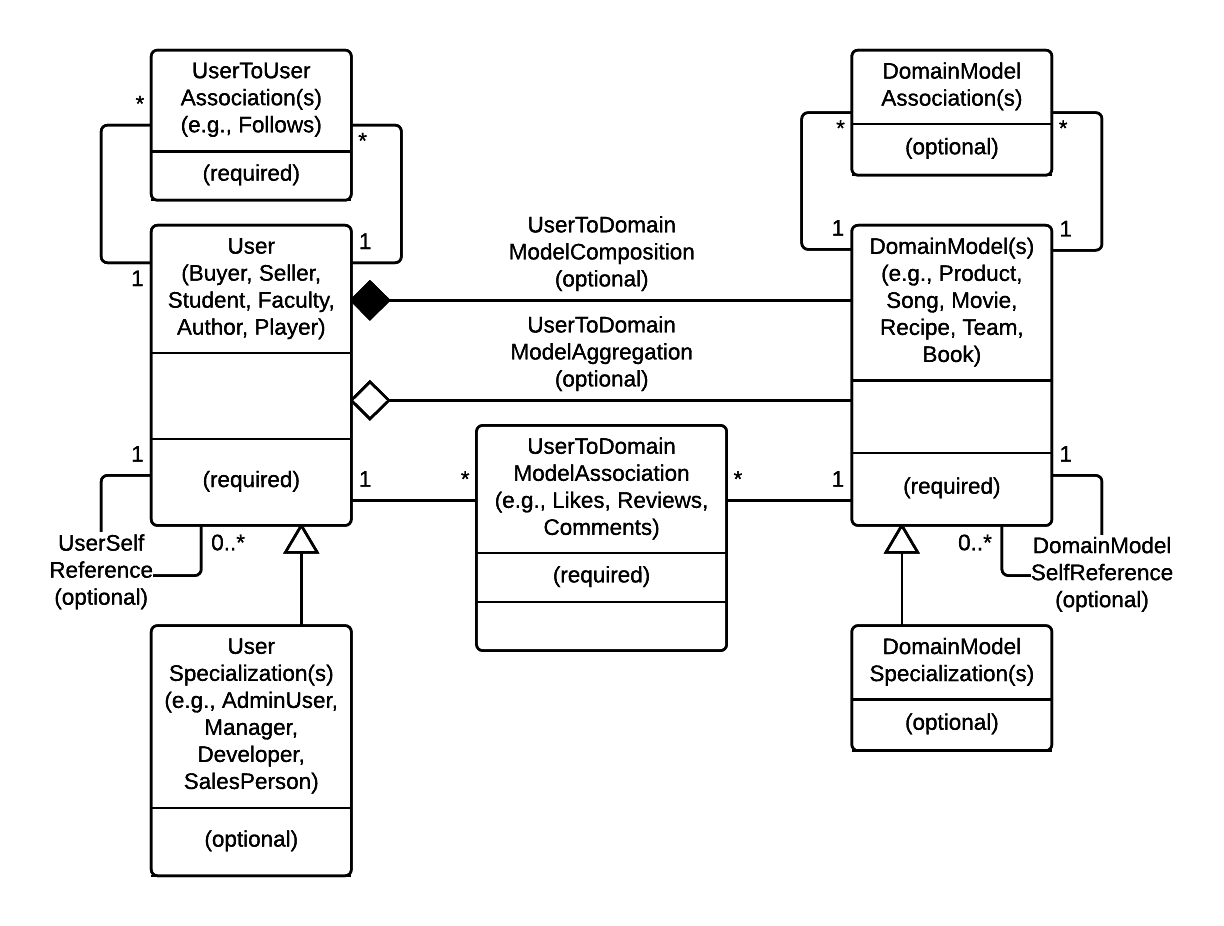
Using Lucidchart for Google Docs or your favorite UML editor, create a UML class diagram and make it available in a wiki page of the git repository. Call the wiki page Design. The class diagram should include at least 5 classes and their relations. Refer to the sample UML diagram for guidance. Here's a generic UML diagram capturing the user, domain objects, and their relationships. Use this as a guide to create your own UML diagram
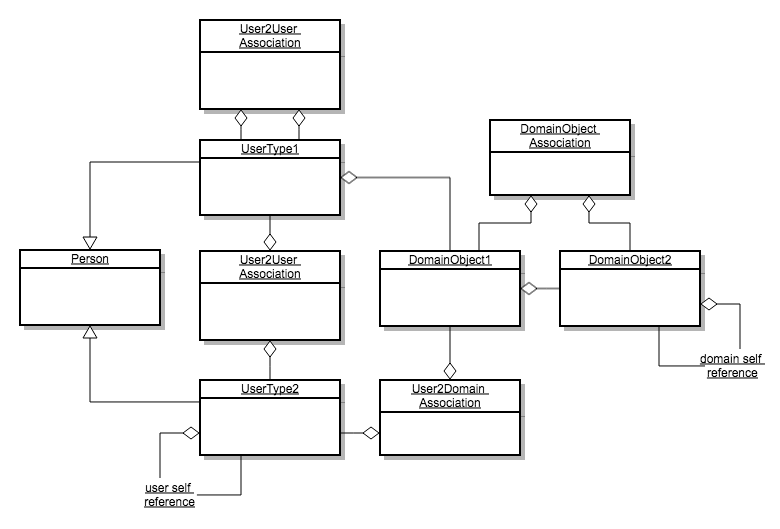
Here are a couple more generic UML diagram capturing the user, domain objects, and several types of relationships. Use this as a guide to create your own data model
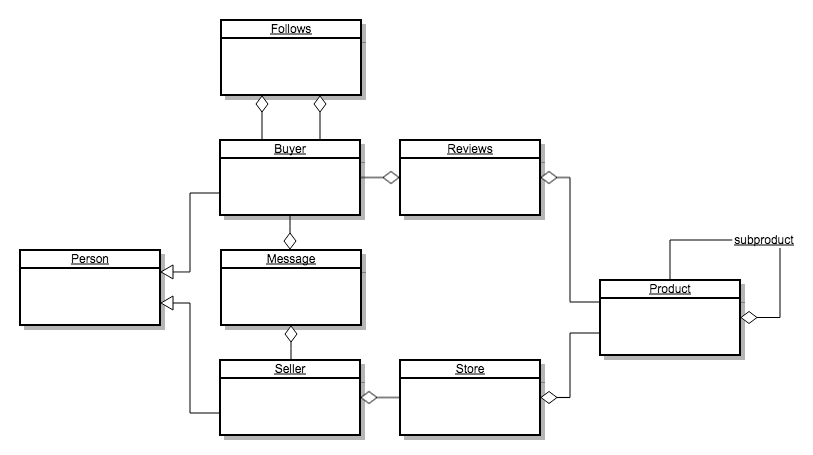
Here are a couple more examples data models. Click to expand.
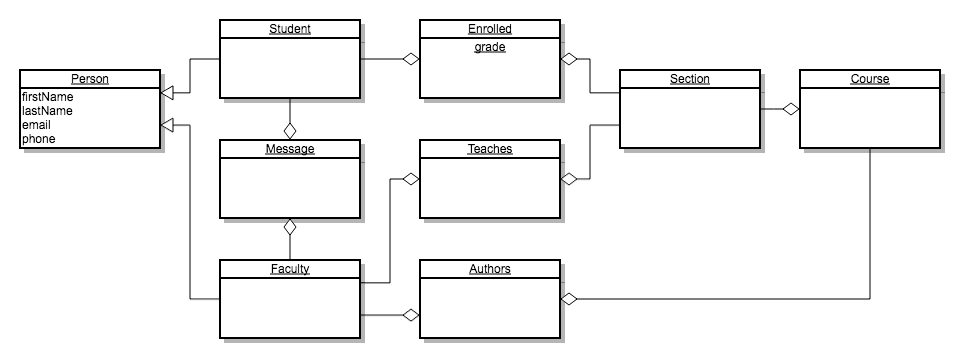
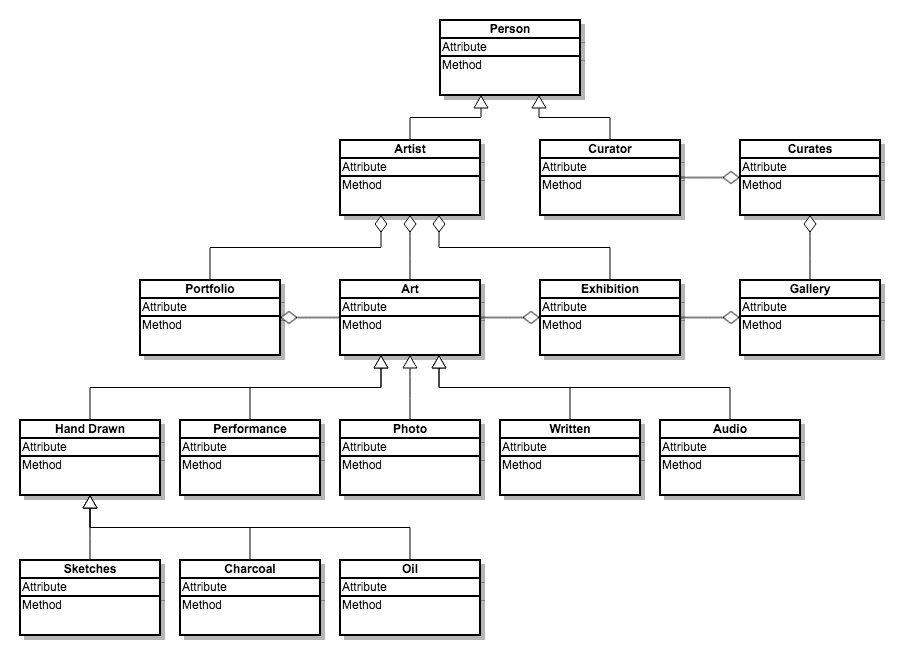
External Web API requirements
Create an interface to an external Web API such as Google maps, IMDB, YouTube, Yelp, Yahoo, Weather Channel, Yumly, Bestbuy, Amazon. The API should allow users to search for content, bookmark content, and retrieve details for a particular content element. If the API allows storing data, and relations between data, then the local database implementation is optional. If the API only allows read only operations, then the local database implementation is required. For instance, LinkedIn and other social network APIs allow registering, login, creating posts, view friends, upload photos, follow friends, search. If you implement most of these features, then the local database implementation is optional. If instead you are only using the Web API to do read only operations, then you must also implement the local database to store information about the search results locally in your database. Discuss the use of Web APIs with your instructor. A good place to start is at programmableweb.com
Field Validation
Cant update username
Login without email
Logout
Maintain session
Password must not be seen, unless requested
No dead ends
Ported from the former course Google Doc so staff can edit these requirements on the site.